
The Bakugan Buzz forum is an archive and is read-only. New posts are closed.
Read-only archive. These are the original Brawlers Forum threads (2009–2021), kept for reference. New posts are closed.
- This topic is empty.
-
AuthorPosts
-
November 18, 2009 at 5:50 am #222590
Kohdok
MemberYeah, I'm probably the only Rabeeder fan in the universe. Yup. Here it is. Now we just need an actual Rabeeder figure to go with it. I'm waiting, Sega Toys.
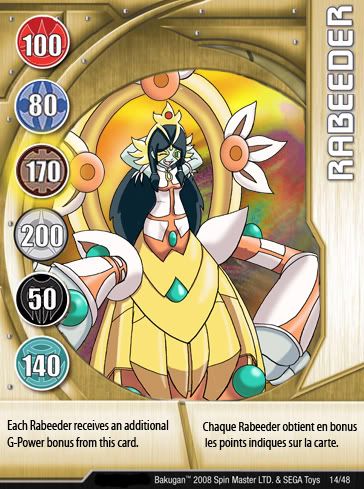 If anyone wants to try this, I started with a Hynoid gold card, added the point values from other cards that were what I wanted with copy-paste, clone-stamped out the text and wrote the card text in Myriad condensed (with a free-transform vertical stretch) while copy-pasting in the letters for the card name (mostly borrowing from Exedra). For the art, I did a layer mask and marked over the original to get rid of it, creating a nice transparent window for my Rabeeder art (Which was by me). Tossed in a background and voila! This required photoshop and some skillz, of course.Still, I amaze me. I should be careful or someone might think this is real!Here's my original artwork:
 November 18, 2009 at 5:55 am #339023
Obito
Memberholy snap, your custom cards pwn…mine suck lol so thanks for the font advice and such
November 18, 2009 at 8:15 am #339074Memberholy snap, your custom cards pwn...mine suck lol so thanks for the font advice and such
Yeah, it's not too hard to do if you exploit the Bakugan.com card collection well enough. You'll probably find any total you need on there and they're all in Jpeg format for easy use. Myriad Condensed is what I used and I think I got it right, but many sans-serif fonts could work. My only regret is that the resolution is really low on the images.
November 18, 2009 at 8:16 am #339075AquosPlayer
Memberwow thats awesomee (Y) they shuld defo make that as a real card! looks genuine aswell !
November 18, 2009 at 8:27 am #339079Darkus Brawler
MemberWow… You have some skills lol, that looks even better than mine…EDIT: OMG you drew the Rabeeder yourself too? If you start recoloring Bakugan Imma kill ya Jk XD
November 18, 2009 at 9:27 pm #339414Haos-Emily
MemberThats awsome, Looks Legit aswell. Print it off, stick it onto Carboard, Print of the back of a card,do the same, and Laminate it, it could pass as a Legit card. 😉
November 18, 2009 at 9:32 pm #339415Metaaltair825
MemberThats awsome, Looks Legit aswell. Print it off, stick it onto Carboard, Print of the back of a card,do the same, and Laminate it, it could pass as a Legit card. 😉
Do these steps except for the cardboard part. Take a duplicate gate you have and take out the metal inside.
November 18, 2009 at 9:33 pm #339416MemberThats awsome, Looks Legit aswell. Print it off, stick it onto Carboard, Print of the back of a card,do the same, and Laminate it, it could pass as a Legit card. 😉
Do these steps except for the cardboard part. Take a duplicate gate you have and take out the metal inside.
I Said do the carboard step because i did this with a Yu-gi-oh card i made, and without the cardboard it was like, well flimsy and that,
November 18, 2009 at 9:38 pm #339420Silent Naga
MemberThat has to be the best Bakugan fanart I have ever seen and will ever see in my entire life ohmygodIcan'tevenPlus, THE CARD, HOW DID YOU GET THE FONT FOR THE CARD NAME? XD
November 18, 2009 at 9:42 pm #339424MemberThats awsome, Looks Legit aswell. Print it off, stick it onto Carboard, Print of the back of a card,do the same, and Laminate it, it could pass as a Legit card. 😉
Do these steps except for the cardboard part. Take a duplicate gate you have and take out the metal inside.
I Said do the carboard step because i did this with a Yu-gi-oh card i made, and without the cardboard it was like, well flimsy and that,
If you put the metal inside, it seems more legit
November 18, 2009 at 9:45 pm #339427Admin
Keymaster…Wow, words CANNOT describe this cards' awesomness.Make a Centorrior card now.
November 18, 2009 at 10:09 pm #339435MemberPlus, THE CARD, HOW DID YOU GET THE FONT FOR THE CARD NAME? XD
I thought I'd already said that. I took text from the other cards one letter at a time. I used the text from the Exedra card because it contained all the letters in Rabeeder's name but "B", which I then took from Light Burst. I put them all on separate layers, aligned them, cleaned off the corners so they'd look more natural on the card, and merged the layers so I could adjust it. If you grab some of the pics from Bakugan.com, you can do the same thing.
Make a Centorrior card now.
I could if you gave me a G-power boost spread (Just rearrange the ones I already have), I could. Just don't expect a picture. I drew it for Rabeeder because she's my favorite.
November 18, 2009 at 10:11 pm #339436KeymasterPyrus: 170Aquos: 100Haos: 50Darkus: 200Subterra: 80Ventus: 140
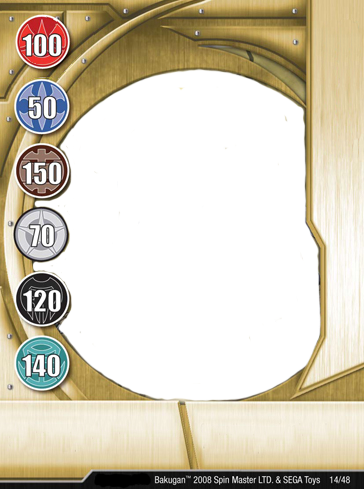
November 18, 2009 at 10:25 pm #339443MemberAnd the highlighted bonus?EDIT: Figured I'd post the blank. The G-powers are still there because you need to actually transfer the discs from other cards to change the G-power. I removed the Highlighted bonus, though. A hue or saturation change can make this a Silver or Bronze card, if you want.
 November 18, 2009 at 10:39 pm #339453
sooners1223
MemberWow. This is truly amazing. Who are you?
-
AuthorPosts
- The topic ‘Rabeeder Gate card (With custom pic!)’ is closed to new replies.